
Cash counting machines
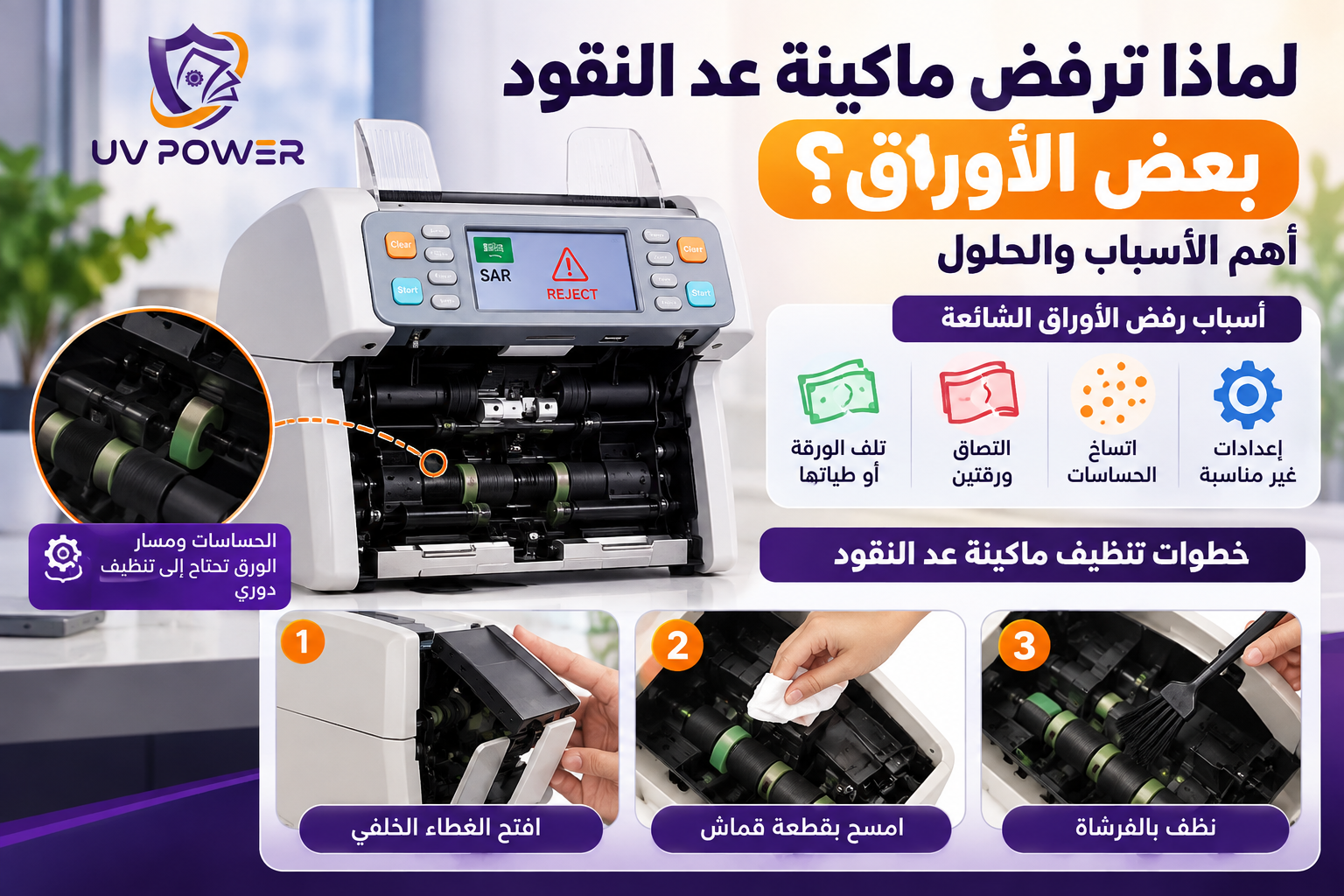
Why does the cash counting machine reject some banknotes? The most important reasons and solutions
October
Why does the cash counting machine reject some banknotes? The most important reasons and solutions
You may notice that The cash counting machine rejects some banknotes Or it stops at a specific sheet despite continuing to count the rest of the sheets normally. This does not necessarily mean there is a fault; the cause may be the sheet itself being damaged, two sheets sticking together, dust accumulation, a feeding problem, or device settings.
In this guide from UV Power, you will learn about the most common reasons for paper rejection, the steps you can safely take, how to distinguish between a paper problem and a machine problem, and when you need an expert inspection.
If you are looking for information about the types of devices and their functions, you can refer to Guide to buying a cash counting machine in Saudi Arabia.
Why does the cash counting machine reject some banknotes?
The banknotes pass through the machine along a feed path and parts that assist in counting. Some models may include sensors to check certain characteristics of the banknotes. When the device detects a problem with the banknote’s passage or a difference in its characteristics according to the inspection standards, it may stop counting or display an error message.
It is important to know that rejection of the paper does not automatically mean that it is counterfeit; furthermore, the continued problem with intact papers may indicate that the device needs cleaning or technical inspection.
The most important reasons for rejection of banknotes in a cash counting machine
- The banknote's deterioration: Severe folds, cracks, or deformations may affect the passage of the sheet through the feeding path.
- Adhesion of two sheets: Two sheets may enter together or be attached to each other, in which case the device detects an abnormal feeding condition.
- Variation in the thickness of the paper: Differences in thickness or the passage of more than one sheet at the same time can lead to an error.
- Dust accumulation: Dust and leaf debris may affect the feeding pattern or some allergies.
- Method of entering the papers: Arranging the package inappropriately or exceeding the recommended capacity may lead to feeding problems.
- Inappropriate settings: The device may be set to a currency or a mode of operation that does not suit the required counting process, depending on the model.
- Functions of detecting fraud: The device may stop working if the paper does not meet the inspection standards it is based on.
- Technical problem: The cause may be related to one of the sensors, the feeding parts, the calibration, or the software.
Did the damaged paper cause the counting machine to reject it?
Yes, the condition of the banknote may affect the feeding process. A folded, torn, or damaged banknote may not pass through the machine in the expected manner, which could lead to a stop in the counting process or the display of an error message.
If the machine consistently refuses to accept a single sheet, remove it and inspect its condition. Then try counting using another set of undamaged sheets. If the machine continues to operate normally, the problem may be related to the same sheet, not necessarily the machine itself.
Does the adhesion of two sheets cause a Double Note error?
Yes, the alert may indicate Double Note In some machines, the detection of two sheets passing or the presence of a feeding situation that appears to be two sheets at the same time can occur. This can happen due to the adhesion of the sheets, their different thickness, or the way the bundle is fed.
When this error appears:
- Stop the counting process and remove the package according to the device instructions.
- Separate the attached leaves and remove the folded or damaged leaves.
- Reorder the sheets before inserting them again.
- Try counting in smaller increments if that is appropriate for the machine specifications.
- If the error occurs with intact sheets, the machine may require an inspection by a technician.
The names of error messages and how to handle them may vary depending on the manufacturer and model, so it is recommended to refer to the device manual when an unknown alert appears.
Does the contamination of the sensors affect the number of leaves?
The accumulation of dust and dirt inside the paper path or around some sensors can affect the machine's performance, especially with continuous use. The problem can manifest itself as frequent stops, feeding errors, or rejection of certain sheets.
To care for the device safely:
- Stop the machine and disconnect the power before cleaning the internal parts.
- Remove the papers from the feeding path.
- Clean the parts that the device manual allows to be cleaned only.
- Do not spray liquids inside the device and do not use unsuitable cleaning agents.
- Do not touch the sensors or try to modify them randomly.
You can find more device care instructions on the page. Maintenance, Warranty, and After-Sales Services at UV Power.
How do I know that the problem is in the counting machine?
It is not possible to determine the damage to the sensor from just one display. However, if the machine rejects different sheets that appear to be intact, and the problem persists after the allowed cleaning and testing of other sheets, the cause may be related to one of the sensors, the feeding parts, or the device settings.
The need for technical inspection increases when repeated error messages appear or the device stops working with different packages. Modification of the sensors or calibration without technical knowledge is not recommended; because incorrect adjustment may affect the performance of the machine.
What do I do if the cash register rejects valid banknotes?
If the sheets appear to be intact but the machine rejects them, follow the following initial inspection steps:
- Stop the counting: Remove the sheets from the feeding path according to the machine instructions.
- Check the paper: Make sure there are no folds, tears, or adhesions on the other sheet.
- Try other papers: Use a different set of valid sheets to see if the problem persists.
- Package arrangement: Make sure the sheets are aligned and placed in the correct way.
- Check the settings: Check the currency and set the operating mode if your device offers these options.
- Clean the device when necessary: Follow the manufacturer's instructions and do not disassemble the internal parts.
- Watch the error message: Write down the text of the message or its code to help the technician identify the problem.
- Request the technical inspection: If the problem persists with different sheets, do not try to modify the internal parts randomly.
Does currency preparation cause the rejection of banknotes?
In some machines that support currency selection or multiple operating modes, the selected settings may affect how the banknotes are recognized and checked. Therefore, it is advisable to ensure that the appropriate currency and function setting is selected.
These options vary from model to model, and some machines do not support all currencies or recognition functions. Refer to the device manual to ensure that the currencies and functions that are actually supported.
What is the relationship between fraud detection techniques and the rejection of documents?
Some cash counting machines use technologies such as UV, MG, IR, CIS To help examine the properties of banknotes, according to the techniques available in each model.
If the paper does not meet the inspection criteria adopted by the device, the count may stop or an alert may appear. However, this alert alone does not prove that the paper is counterfeit; the paper's condition, feeding problem, or device malfunction may result in an unexpected result.
To learn about the different functions of the devices, read also The difference between a cash counting machine with fraud detection and without fraud detection.
Why does the machine reject one sheet while it is preparing the rest of the sheets?
If the machine is operating normally with most papers and rejects only one paper, the cause may be related to the characteristics of that paper, such as folds, damage, or adhesion to another paper.
If it continues to reject different papers repeatedly, it is important to check the feeding path, the cleanliness of the machine, and the appropriate settings. If the problem persists after these steps, the machine may need an inspection by a technician.
What does the Parameter Abnormal mean in the cash counting machine?
A message may appear Parameter abnormal In some machines, there is an indication of an abnormal condition associated with one of the values or settings that the operation relies on. However, the exact meaning of the message and the required action vary depending on the manufacturer and model.
When it appears, write down the message as it appears on the screen, and return to the device manual or contact technical support. Do not change the internal settings or calibrate values randomly; this may worsen the problem.
Does the software update solve the problem of the rejection of documents?
Some software updates may help to address software issues or support certain functions, if the update is available and compatible with the model. However, software updates are not a universal solution for all paper rejection situations.
If the cause is related to paper damage, dust, the feeding path, or one of the internal components, updating may not solve the problem. Therefore, it is necessary to first determine the cause of the malfunction and ensure that the manufacturer's instructions are followed before performing any update.
When does a cash register need calibration?
Some machines may require calibration or technical adjustment when problems with counting, feeding, or detection continue after cleaning and testing with clean sheets. Calibration procedures vary depending on the model and the type of problem.
If you do not have approved instructions for performing the calibration, it is better to hire a qualified technician instead of modifying the internal settings without technical knowledge.
How can you reduce paper rejection problems in a cash register?
- Clean the device periodically according to the manufacturer's instructions.
- Maintain the cleanliness of the feeding path and the parts that the device manual allows to be cleaned.
- Inspect the sheets and discard those that are severely damaged or folded tightly when necessary.
- Arrange the package before inserting it into the machine.
- Comply with the package size and the specified method of inserting the papers for the model.
- Use the appropriate currency settings and operating mode.
- Monitor the repeated error messages and record them when necessary.
- Sensors or calibrations are not modified without technical knowledge.
- Request a technical inspection if the problem persists with intact papers.
For more information about after-sales services, you can visit the page Maintenance and warranty at UV Power.
Is cleaning the cash register machine enough to solve the problem?
Cleaning may be sufficient when the problem is related to the accumulation of dust or dirt in parts that are allowed to be cleaned. However, it does not address all mechanical or electronic malfunctions.
If the machine continues to reject the valid papers after cleaning and trying another set, it is better to inspect the machine to determine the cause instead of repeating the cleaning or changing the spare parts without diagnosis.
What is the difference between the problem of counting and the problem of detecting fraud?
The problem of counting It may be related to the passage of the sheets, their adhesion, their arrangement, or the feeding path. The problem of detecting fraud It relates to the inspection functions supported by the device and the recognition criteria it relies on.
Symptoms may sometimes be similar, so it is important to know the error message and the nature of the problem before determining the appropriate action. You can read How does the cash counting machine work? An explanation of the counting mechanism and the detection of counterfeiting To understand how the device works in more detail.
How do you choose the right cash register for your business?
The choice of machine depends on the size of the cash that the establishment handles and the required functions. Some activities may require basic counting, while other establishments require additional functions such as mixed counting, value calculation, or banknote inspection.
Before purchasing, check the supported currencies, the device's functionality and usage method, the availability of technical support, and the appropriate spare parts for the model.
You can review UV Power Store To compare the available machines and choose the appropriate device for your business needs.
When do you need a maintenance technician for a cash register machine?
It is recommended to request a technical inspection if the machine continues to reject various papers that appear to be intact after checking the order of the papers and cleaning the machine in the appropriate manner.
It is also necessary to have the device checked when the sensitivity settings are repeated, the calibration is performed, the feed is adjusted, or abnormal sounds or frequent shutdowns occur. Avoid disassembling the device or changing the sensitivity settings or internal settings without technical expertise.
If the machine needs maintenance or replacement parts, you can visit the page Maintenance, Warranty, and After-Sales Services at UV Power To learn about the available information and how to contact us.
The conclusion
A cash register may reject some banknotes due to paper damage, two papers sticking together, dust accumulation, operating settings, feeding problem, or sensors. Rejecting a banknote does not necessarily mean that it is counterfeit or that the machine is defective.
Start by examining the sheet and trying another set, making sure the package is in the correct order and setup. Clean the device according to the manufacturer's instructions, and if the problem persists with intact sheets, request a technical inspection before adjusting the settings or replacing the parts.
In UV Power We provide cash counting machines and cash handling solutions, along with technical support, maintenance, and spare parts depending on the model and condition.
If you are looking for a new device, you can start from Guide to buying a cash counting machine in Saudi Arabia Then compare the available options in UV Power Store.
Frequently asked questions about paper rejection in the cash register
Why does the cash counting machine reject some banknotes?
The cause may be a damaged sheet, folds, two sheets sticking together, a contaminated feeding path, or a problem with the settings or sensors, depending on the model.
Why doesn't the cash machine count the banknotes correctly?
The problem may be related to the condition of the sheets, the method of feeding them, the feeding path, or the need for cleaning. If the problem persists with intact sheets, the machine may require an inspection by a technician.
What does a Double Note error mean?
This warning in some machines indicates the discovery of a feeding situation where two sheets appear to have entered together. Examine the package and separate the attached sheets; if the error repeats, consult the device manual or request an expert inspection.
Does refusing the paper mean that it is fake?
No. The reason may be a damaged paper, a feeding problem, or device settings. A rejection message alone cannot be considered conclusive evidence of forgery.
Does cleaning the cash machine solve the problem of paper rejection?
Cleaning may help if the problem is related to dust or dirt, but it does not solve all malfunctions. If the problem persists after the allowed cleaning, the machine may need an inspection by a technician.
When does a cash register need maintenance?
If you continue to reject various documents that appear to be valid or if repeated errors appear after trying the initial verification steps, it is best to hire a qualified technician.