


money counting machine
Preparing Cash Bundles: Batch and ADD Functions on a Money Counter
Nov
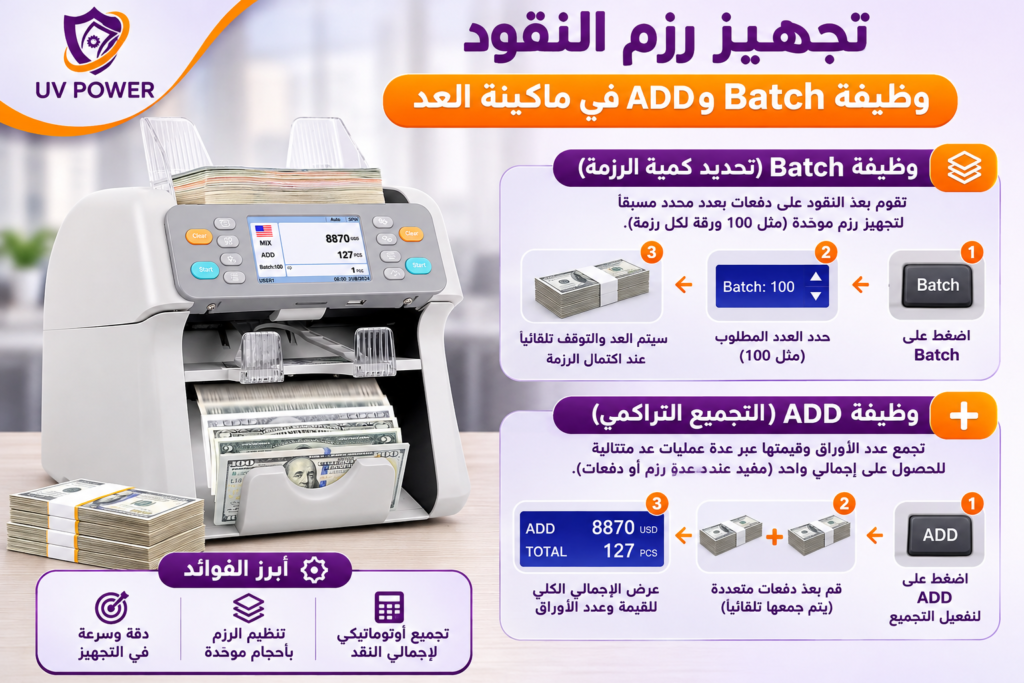
Preparing cash bundles of a fixed count, such as 100 notes per bundle, is done on a money counter with the stop-at-a-set-count function (Batch). The ADD function, on the other hand, combines consecutive batches into one total. Knowing the difference saves you from recounting.
What is the Batch function in preparing cash bundles?
You set a number, such as 100, and the machine stops every time it counts that number. You remove the bundle, and the machine continues with the next one. The result is equal bundles ready for strapping or deposit.
What is the ADD function?
You load the cash in batches, and the machine adds each batch's result to the previous ones until you clear the total. It is useful when the cash exceeds the hopper capacity.
Which machines support preparing cash bundles?
| Machine | Stop at a set count | Other features |
|---|---|---|
| U-P200 Battery | Yes | Automatic and manual counting |
| U-P2000 | At a set count or amount | Mixed counting and a reject pocket |
| L1 | Yes | Mixed counting for riyals |
| U-P500 | Yes | Mixed counting and serial number reading |
| Magner 2000V / 2000F | Yes, plus stop at an amount | ADD and separation of old and new issues |
| Glory C / F | Yes, plus stop at an amount | ADD |
| Lidix | — | ADD |
| U-P400 (coins) | Stops at a set number of coins | Sorts 6 denominations |
Functions are taken from the product pages in the store. If your machine is not in the table, message us and we will confirm its functions.
How to prepare cash bundles step by step
- Choose the right counting mode: count only for single-denomination bundles, or Mix for mixed denominations.
- Enable stop at a set count and enter the number you need, such as 100.
- Place the cash in the hopper and press start. When it stops, remove the bundle and strap it.
- Check rejected notes by hand before adding them.
- Print the report or record the total if your machine supports it.
Frequently asked questions
How many notes are usually in a bundle? 100 notes is common, but the number is set by your own system or the bank you deposit with.
Are rejected notes counted in the bundle? No. The machine does not count them, so it completes the bundle with genuine notes.
What is the difference between stopping at a count and stopping at an amount? The first stops the machine after a set number of notes; the second stops it after reaching a set value in riyals.
Can I prepare bundles of coins? Yes. The U-P400 stops at a set number of coins, and the U-P1000 supports batches.
The difference between counting notes and counting value is explained in this guide, and for the current riyal denominations see the the sixth issue page on the Saudi Central Bank website.
Preparing bundles for deposit every day? Message us on WhatsApp with your cash volume, and we will recommend a machine that stops at a set count or amount.
