


money counting machine
U-P300 vs. U-P500 vs. U-P2000: Which Machine Is Right for You?
October
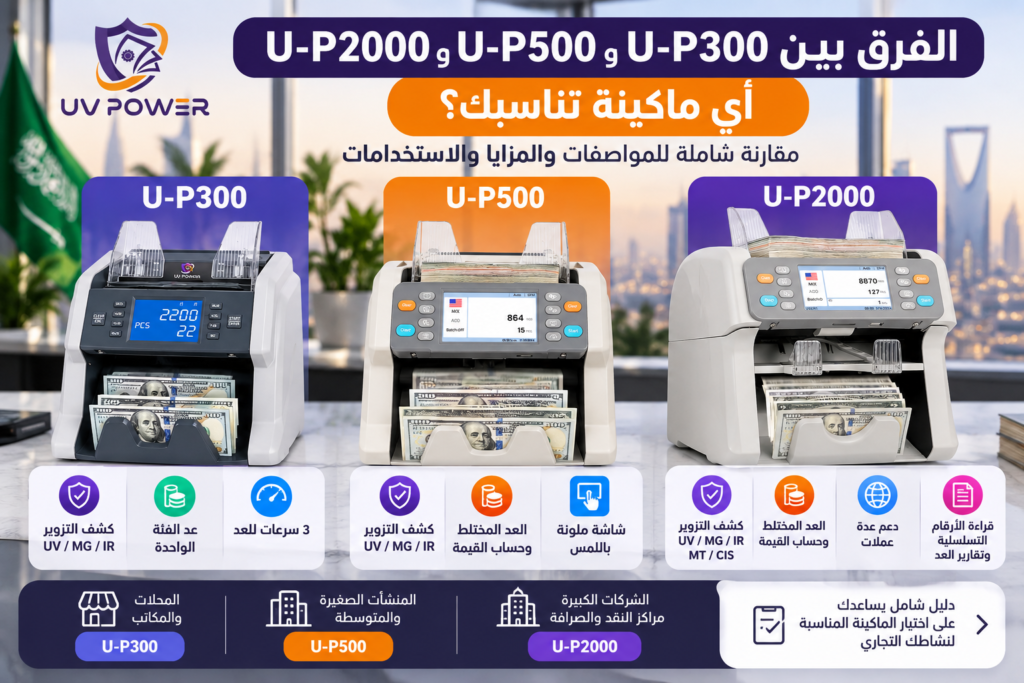
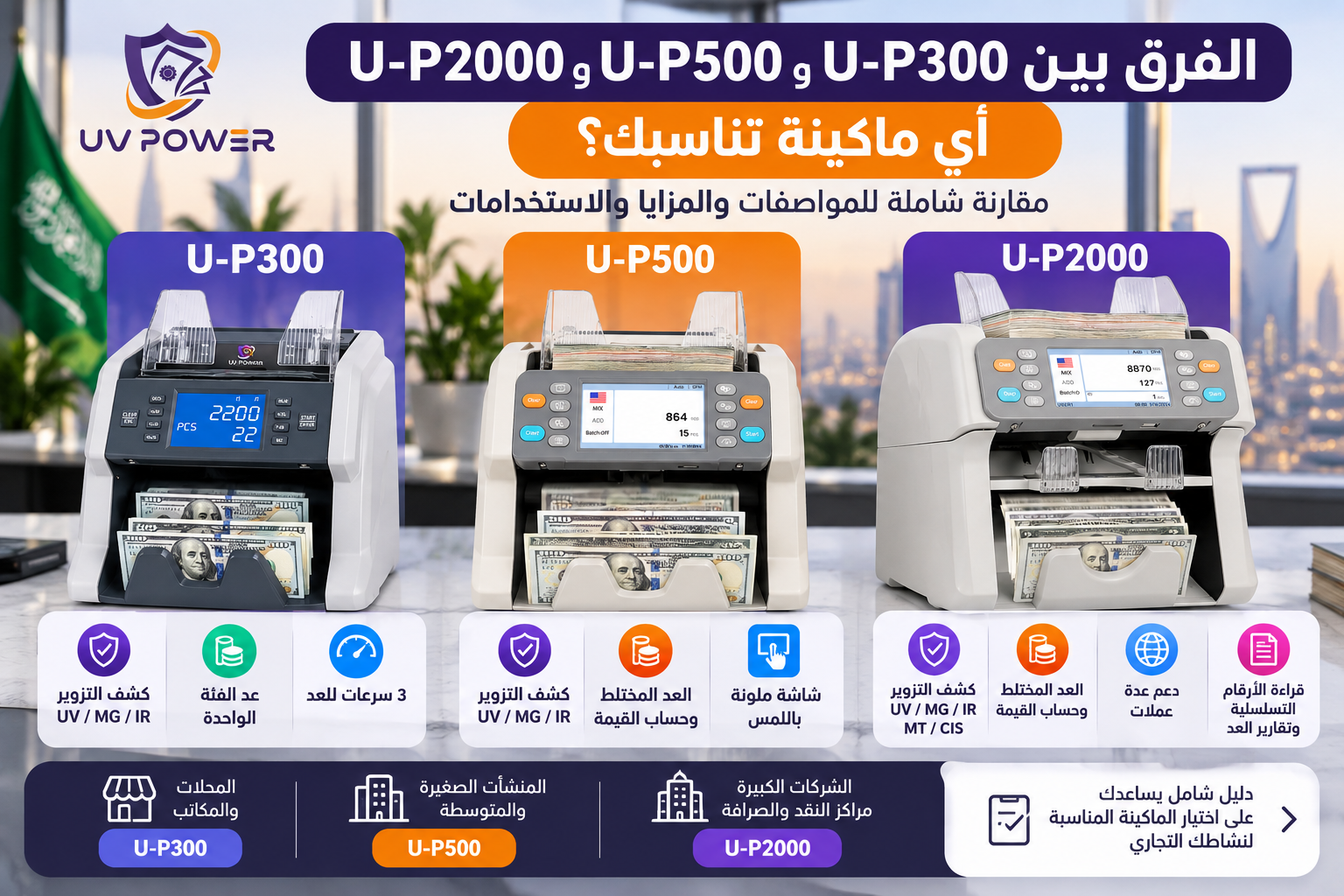
The difference in three lines: The U-P300 counts one denomination at a time and calculates its value with counterfeit detection (UV, MG, and IR), suiting those who sort denominations themselves. The U-P500 counts mixed denominations and calculates the total, with a touchscreen, dual CIS, and support for 20 currencies. The U-P2000 adds a separate reject pocket.
The rule, then: if your stacks are mixed, do not go below the U-P500; if rejected notes interrupt your work, move up to the U-P2000.
What is the main difference between the U-P300, U-P500, and U-P2000?
The main difference is the level of functionality and how cash is handled. The U-P300 focuses on practical counting and inspection, the U-P500 adds mixed counting, and the U-P2000 offers a wider range of advanced functions, including additional inspection technologies and counting results management, according to the machine's specifications and settings.
| Comparison point | U-P300 | U-P500 | U-P2000 |
|---|---|---|---|
| Typical use | Shops, offices, and small businesses | Businesses that need more advanced functions | Businesses that need advanced cash management functions |
| Mixed counting | No, per the current comparison | Yes | Yes |
| Listed inspection technologies | UV / MG / IR | Check the product specifications | UV/MG/IR/MT/CIS |
| Serial number reading | Check the machine's specifications | Check the machine's specifications | For some supported currencies |
| Counting report management | Check the machine's specifications | Check the machine's specifications | Save, print, and export options, depending on connection and software requirements |
This comparison is a guide, not a substitute for the official technical specifications. See the pages for the U-P300 andU-P500 andU-P2000 to check the functions available on each model.
First: The U-P300 — who is it for?
The U-P300 is an option worth considering for shops, offices, and small businesses that need practical cash counting, with functions that help check suspicious notes during operation.
The U-P300 offers:
- Counting notes by a selected denomination.
- Display of the note count and value, depending on the operating mode.
- Three counting speeds.
- Large LCD screen.
- UV, MG, and IR inspection technologies.
If you separate denominations before counting and don't need mixed counting, these functions may meet your needs without moving to a machine with more advanced capabilities.
The U-P300 may suit you if you:
- Run a shop or point of sale.
- Need to count cash as part of daily cash drawer closing.
- Usually handle one denomination per count.
- Want counting and inspection functions without needing every advanced function.
See U-P300 page to view its specifications and make sure it meets your needs.
Second: The U-P500 — when do you need more advanced functions?
The U-P500 targets businesses that need more flexibility in handling cash. A key difference from the U-P300 is mixed counting support, which helps handle notes of different denominations in one run, provided the denominations and currencies are supported.
The listed functions for this model include:
- Mixed counting support.
- Large color touchscreen.
- More flexible options for handling counting operations.
- Additional functions according to the model's published specifications.
The U-P500 may suit stores and businesses that handle higher cash volumes or want to reduce the need to separate denominations by hand before counting.
When should you choose the U-P500 over the U-P300?
If you need to count notes of different denominations and calculate the results in one run, the U-P500 may be closer to your needs. If you count each denomination separately and don't need mixed counting, the U-P300 may be enough.
Don't rely on the model name alone when comparing; check the actual functions and supported currencies on the U-P500 page.
Third: The U-P2000 — for advanced functions and cash management
The U-P2000 offers a wider range of functions, worth considering for businesses that handle high cash volumes or need additional inspection and counting results management capabilities.
The functions mentioned for this model include:
- Mixed counting and handling of supported denominations.
- Counting, totaling, and sorting functions according to the machine's settings.
- Inspection technologies including UV, MG, IR, MT, and CIS.
- Serial number reading for some supported currencies.
- Saving, printing, or exporting counting reports when the appropriate software and connection are available.
- Multiple counting speeds, up to 1,200 notes per minute, depending on the selected setting and listed specifications.
These capabilities may help businesses that need more detailed procedures, but make sure the functions you need are available for your machine, software, and currency versions.
For details, see the U-P2000 page.
When should you choose the U-P2000 over the U-P500?
Consider the U-P2000 if you need more than basic counting functions, such as additional inspection functions, serial number reading for some supported currencies, or counting report management.
If your needs are limited to mixed counting and the everyday functions supported by the U-P500, you may not need all the additional capabilities of the U-P2000.
What is the difference between the models in detecting suspicious banknotes?
Inspection technologies vary between models. This guide lists UV, MG, and IR on the U-P300, and additional technologies including MT and CIS on the U-P2000. Confirm the U-P500's inspection technologies on its product page or technical specifications.
If detecting suspicious banknotes is a priority for you, compare the scanning techniques actually supported in the three models and ensure that they are compatible with the Saudi riyal and the other currencies your business deals with.
You can read the guide to counterfeit detection technologies in money counting machines, and you can also refer to the Saudi Central Bank's banknote security features.
What is the difference between mixed counting and single-denomination counting?
Single-denomination counting means counting notes of a specific denomination in each run. Mixed counting lets you place notes of different denominations in the same run; the machine then recognizes the supported denominations and calculates the results according to its capabilities.
For example, if you separate notes by denomination before counting, basic counting may suit you. But if you receive bundles with different denominations and need to know the total value, look for a machine that supports mixed counting and value calculation for the currencies you use.
According to the comparison in this guide, the U-P500 and U-P2000 support mixed counting, while the U-P300 counts a selected denomination.
Which machine suits small shops and companies?
The choice isn't tied to business size alone; it also depends on how you handle cash and the functions you need.
- Small shops and offices: The U-P300 may be suitable if you need counting and inspection without mixed counting.
- Stores with varied cash denominations: Consider the U-P500 if you need mixed counting.
- Companies with advanced counting requirements: Consider the U-P2000 if you need additional inspection, reporting, or serial number reading for supported currencies.
- Currency exchange companies and cash centers: First define your currencies, operating volume, and data management requirements, then check that the chosen machine supports them.
If your business needs advanced functions, you can also read Professional Money Counting Machines for Companies to compare options suitable for business use.
Is counting speed the most important factor?
Speed is important, but it is not the only factor in choosing a money counting machine. Additional functions may be more important if you need mixed counting, document verification, or managing the money counting machine reports.
Quick comparison: Which model should you choose?
| Your main need | Model to consider | Why |
|---|---|---|
| Practical counting and inspection without mixed counting | U-P300 | Offers the counting and inspection functions listed in its specifications |
| Counting notes of different denominations in one run | U-P500 | Supports mixed counting according to the machine's specifications |
| Advanced inspection and counting results management | U-P2000 | Offers the wider range of functions listed in this guide |
| Serial number reading for some supported currencies | U-P2000 | Check supported currencies and the software version before buying |
Why do warranty and maintenance matter when choosing a machine?
If you plan to use a money counting machine daily, it is important to consider the availability of technical support, spare parts, and maintenance, as well as the technical specifications.
Ask about the warranty period, terms, and coverage for the model you want to buy, as terms may vary by product and sale. See the UV Power warranty and maintenance page for information on available service options.
Regular care and following the manufacturer's cleaning instructions also help maintain the machine's performance. You can use the money counting machine maintenance and cleaning guide.
Checklist before buying the U-P300, U-P500, or U-P2000
Before making your final decision, answer the following questions:
- Do I need to count notes only, or calculate their value too?
- Do I count each denomination separately, or do I need mixed counting?
- How much cash do I handle daily?
- Which currencies and denominations do I need supported?
- Which inspection technologies does the model offer for the currencies I use?
- Do I need serial number reading for some currencies?
- Do I need to save, print, or export counting reports?
- Are the necessary software and connection available for the functions I need?
- What is the warranty period, and what maintenance and spare parts services are available?
Frequently asked questions about the U-P300, U-P500, and U-P2000
What is the difference between the U-P300 and the U-P500?
The U-P300 focuses on practical counting of a selected denomination with the inspection functions listed in its specifications, while the U-P500 supports mixed counting and offers additional functions. The choice depends on whether you need to handle different denominations in one run.
What is the difference between the U-P500 and U-P2000?
Both count mixed denominations. The U-P2000 has two pockets, one for counted notes and one for rejects, so counting does not stop at a suspicious note. Both support 20 currencies.
Does the U-P300 support mixed counting?
No. The U-P300 counts one denomination per pass and calculates its value. For mixed denomination counting, choose the U-P500 or U-P2000.
Is the U-P2000 suitable for large companies?
The U-P2000 may be worth considering for businesses that need advanced counting, inspection, and results management functions. The final choice depends on your cash and currency volume and the functions you need.
Which machine is best for the Saudi riyal?
It depends on the functions you need and the compatibility of the machine and its software with the Saudi riyal. Make sure the specific model supports the currencies and denominations you need before buying.
Should I buy the most expensive machine?
Not necessarily. It's better to choose a machine that provides the functions you actually need. A simpler model may be enough if you don't need mixed counting, reports, or other advanced functions.
Summary: How do you choose between the U-P300, U-P500, and U-P2000?
U-P300: worth comparing if you need a practical machine for counting and inspection and don't need mixed counting.
U-P500: worth comparing if you need mixed counting and more flexibility with different denominations.
U-P2000: worth considering if you need a wider range of advanced inspection and results management functions, after checking the currencies and functions the machine supports.
Start by defining your business needs, then compare the specifications on the pages for the U-P300 andU-P500 andU-P2000.
You can also browse the UV Power money counting machines section to compare the available models and choose the machine that best fits your business. If you are still comparing other types, go back to the guide to choosing a money counting machine.
