


money counting machine
Money Counter Problems and Fixes: A Troubleshooting Guide from “Won't Turn On” to “Notes Jamming”
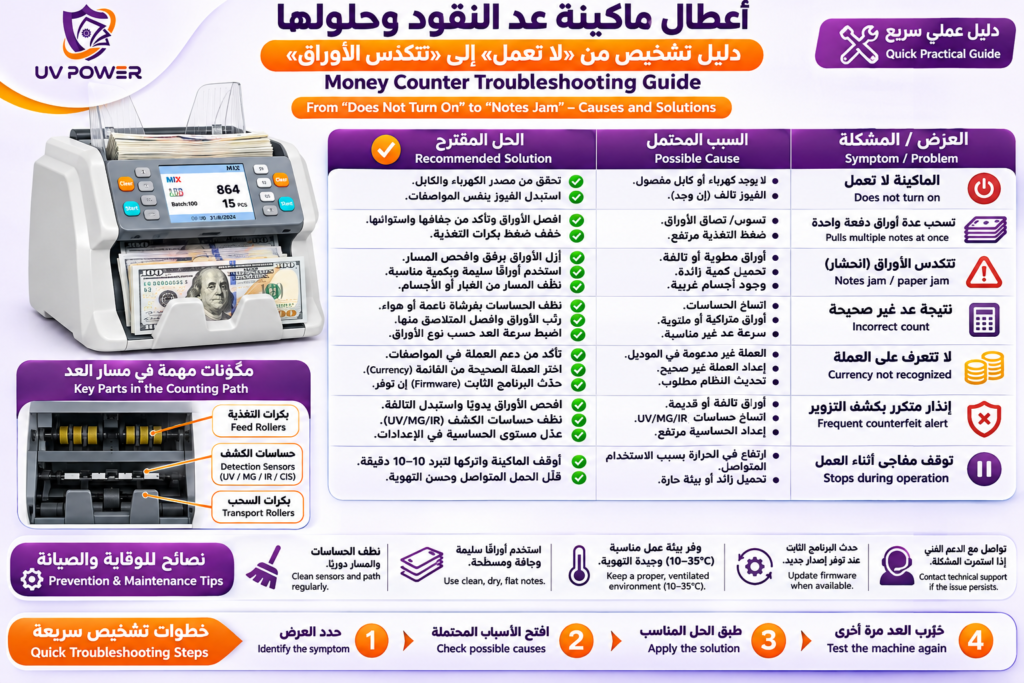
Nov
Most everyday money counter problems have a simple cause: power, a stuck note, dust on the sensors, or an untidy bundle. This guide is organized by what you see: find the symptom, follow the safe checks in order, and if the problem isn't solved, it needs a technician.
If your problem is that the machine rejects notes or shows Double Note, see Why does a money counting machine reject some notes?.
First: a quick 3-step check
- Turn the machine off and unplug it, then remove all notes from the hopper, the stacker and the feed path.
- Look for a foreign object: a staple, clip, rubber band or torn piece of paper.
- Restart with a small bundle of good notes of a single denomination. If the problem disappears, the cause is usually the notes or how they were loaded.
Quick troubleshooting table
| What you see | Likely cause | What to do first | When to call a technician |
|---|---|---|---|
| The display doesn't light up at all | Outlet, cable, power switch | Try another outlet and check the cable at both ends | If it doesn't work with a working outlet |
| Numbers appear without pressing any key | A stuck key or a foreign object under the keypad | Check the keys and clean the keypad surface | If it continues after cleaning |
| The motor doesn't run | An obstruction in the path, or the machine is set to manual start | Remove the obstruction and check the auto-start setting in the manual | Immediately if you hear humming or smell burning |
| The motor runs but notes are not fed | Dirty pick-up roller or loose belt | Clean the feed rollers as the manual describes, and check the hopper thickness adjuster if there is one | If the roller doesn't turn when the motor runs |
| Intermittent feeding (starts and stops) | Dust on the hopper sensors, or wavy notes | Clean the sensor windows, and flatten and fan the notes before loading | If it keeps happening with good notes |
| Frequent Skew or Chain messages | Skewed or overlapping notes, or the hopper guides are not adjusted | Face the bundle in one direction and adjust the guides to the note width | If it continues with tidy bundles |
| Notes stuck inside the machine (Jam) | A torn note or a foreign object | Turn the machine off, open the cover you are allowed to open, and gently remove the note | If the note is somewhere you can't reach without disassembly |
| Stacker sensor message at power-on | Dust or a note in the output area | Empty the stacker and clean its sensor as the manual describes | If the message stays while the stacker is empty |
| The stacker wheel doesn't turn | An obstruction or a drive fault | Remove any note caught between the blades | Usually yes, as it is a mechanical fault |
Power and keypad problems
If the display doesn't light up: try an outlet you know works, check the cable for damage or a loose connection, and check the power switch. On battery-powered machines, start with a full charge. Do not open the machine's housing to check the electrics yourself.
If numbers appear or settings change without you pressing anything, the cause is most likely a stuck key or a small object under the keypad.
Feeding problems
The machine doesn't feed the notes
If the motor runs but the notes don't move, the pick-up roller has most likely lost its grip because of dust, or the bundle isn't touching it. Clean the rollers as your machine's manual describes, and make sure the bundle is pushed all the way into the hopper.
The machine feeds two or more notes at once
New notes stick together more than circulated ones. Fan the bundle by riffling the notes between your fingers before loading. If your machine has a hopper thickness adjuster, check its setting in the manual. If a Double message appears, the details are in our article on rejected notes.
Intermittent feeding
Does the machine start and then stop for no obvious reason? Start by cleaning the hopper sensors and the note path, then try flat, unwavy notes. Notes folded in the middle or curled at the edges are a common cause of this problem.
Common messages and what they generally mean
Message names and codes vary between manufacturers, but these terms come up often:
| Message | General meaning | First step |
|---|---|---|
| Skew | A note entered at an angle | Tidy the bundle and adjust the guides |
| Chain | Two notes partly overlapping | Fan the notes |
| Double | Two notes on top of each other | Separate the stuck notes |
| Half | A short or cut note | Check the note by hand |
| Jam | A jam in the note path | Turn the machine off and remove the note |
If you see a code or number you don't recognize, check your machine's manual, as the same code can mean different things on different brands.
Sensor and stacker problems
Some machines check their sensors at power-on and show a message such as “Clean stacker sensor” if dust covers it. Empty the stacker and clean the sensor windows the way your model's manual specifies.
Some manufacturers recommend an alcohol wipe instead of compressed air spray, while others allow air. So follow your machine's manual specifically. For details on routine cleaning, see money counting machine maintenance.
A tip that prevents many of these problems: Keep the machine in a fixed spot away from dust and direct air-conditioning airflow. Moving it between tables all the time increases dust on the sensors. If the customer needs to see the result, an external customer display, if available for your machine, is better than moving the machine.
When should you stop and contact support?
Stop trying and call a technician in these cases:
- A burning smell, smoke, or the motor humming without moving.
- The same fault with good notes after cleaning.
- A roller or wheel that doesn't turn when the motor runs.
- Reaching the problem requires removing parts the manual doesn't allow you to remove.
Before contacting us, have ready: the model name, the message text or a photo of it, when the fault appears (at power-on, after a few minutes, or with a certain denomination), and a short video if possible. This shortens the diagnosis a lot. See UV Power maintenance and warranty page or message us on WhatsApp.
Frequently asked questions
Can I open the machine myself? Only open the covers the manual allows for cleaning or removing a note. Internal disassembly can shift the sensors and require calibration.
Why do problems increase on peak days? Because more notes pass through and they carry more dust. Cleaning at the end of each busy day reduces this. For planning busy seasons, see Seasonal cash management.
Does a fault affect counting accuracy? Faults that stop the machine usually don't change the total. But if you doubt a result, follow the verification method in Money counter accuracy.
Read also: How Does a Money Counting Machine Work? · Money counter glossary
